
One of raylibr’s nicest features is that R’s 657 built-in color names work everywhere a color is expected. This guide covers the full color system.
R color names
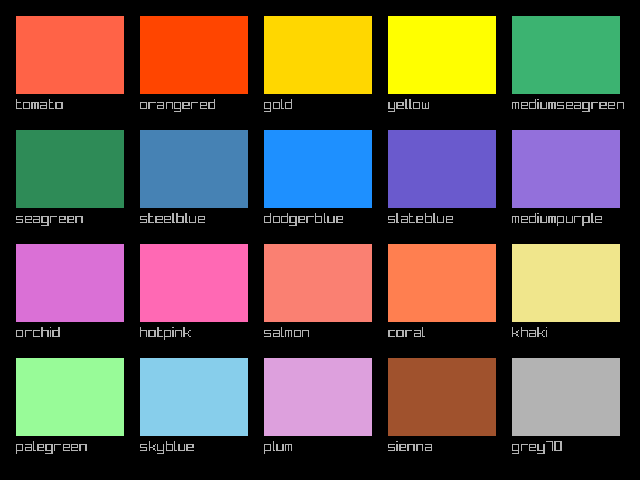
Any function that takes a color argument accepts an R color name as a string:
colors <- c(
  "tomato", "orangered", "gold", "yellow",
  "mediumseagreen", "seagreen", "steelblue", "dodgerblue",
  "slateblue", "mediumpurple", "orchid", "hotpink",
  "salmon", "coral", "khaki", "palegreen",
  "skyblue", "plum", "sienna", "grey70"
)
cols <- 5L
w <- 108L
h <- 78L
pad <- 16L
for (i in seq_along(colors)) {
  row <- (i - 1L) %/% cols
  col <- (i - 1L) %% cols
  x <- pad + col * (w + pad)
  y <- pad + row * (h + pad + 20L)
  draw_rectangle(as.integer(x), as.integer(y), w, h, colors[i])
  draw_text(colors[i], as.integer(x), as.integer(y + h + 3L), 15L, "grey70")
}
This includes all of colors() from base R —
"red", "steelblue", "grey90",
"antiquewhite", and 653 more.
The color struct
For precise control, construct colors with RGBA values (0–255):
col <- color(255, 100, 50, 255)
col$r
#> [1] 255
col$a
#> [1] 255
Convert from other representations with as_color():
Transparency
color_alpha() creates a transparent version of any
color. The alpha ranges from 0 (invisible) to 1 (opaque):
draw_circle(240L, 210L, 125.0, "tomato")
draw_circle(320L, 210L, 125.0, color_alpha("steelblue", 0.6))
draw_circle(400L, 210L, 125.0, color_alpha("gold", 0.6))
draw_circle(280L, 290L, 125.0, color_alpha("mediumseagreen", 0.5))
draw_circle(360L, 290L, 125.0, color_alpha("orchid", 0.5))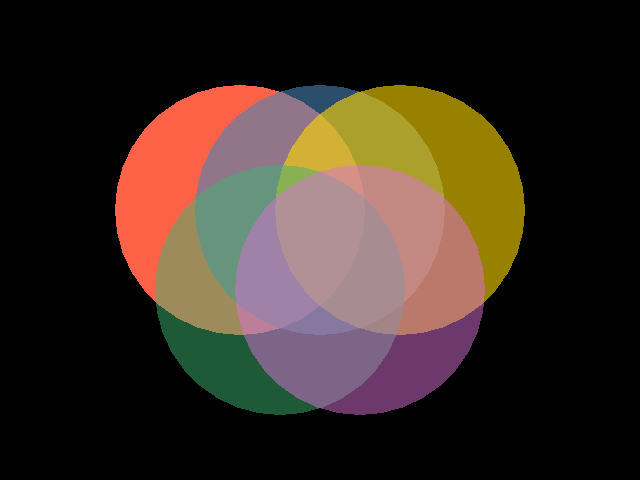
fade() does the same thing as color_alpha()
— both set the alpha channel.
Color manipulation
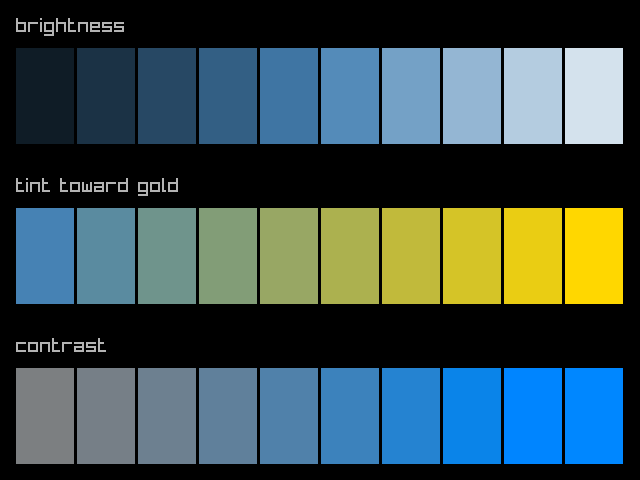
raylibr provides functions to adjust colors:
base <- "steelblue"
w <- 58L
h <- 96L

# Brightness: -255 to 255
draw_text("brightness", 16L, 16L, 20L, "grey70")
for (i in 0:9) {
  b <- -200 + i * 44
  draw_rectangle(16L + as.integer(i) * (w + 3L), 48L, w, h,
                 color_brightness(base, b / 255))
}

# Tint
draw_text("tint toward gold", 16L, 176L, 20L, "grey70")
for (i in 0:9) {
  frac <- i / 9
  draw_rectangle(16L + as.integer(i) * (w + 3L), 208L, w, h,
                 color_lerp(base, "gold", frac))
}

# Contrast: -255 to 255
draw_text("contrast", 16L, 336L, 20L, "grey70")
for (i in 0:9) {
  c_val <- -200 + i * 44
  draw_rectangle(16L + as.integer(i) * (w + 3L), 368L, w, h,
                 color_contrast(base, c_val / 255))
}
-
color_brightness(color, factor)— lighten (positive) or darken (negative) -
color_contrast(color, factor)— increase or decrease contrast -
color_tint(color, tint)— tint a color toward another
HSV color space
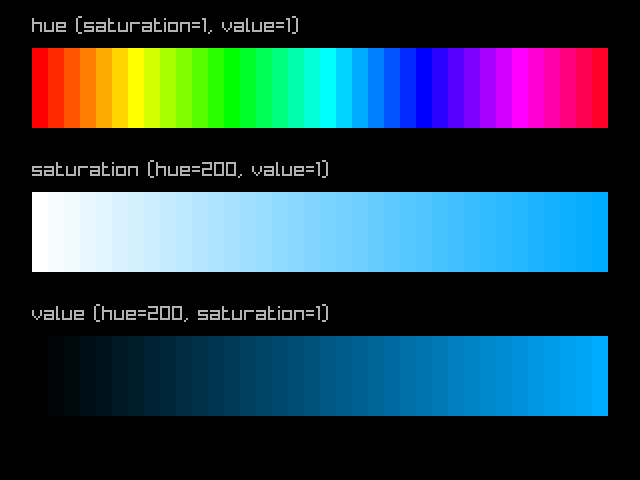
color_from_hsv() creates colors from hue (0–360),
saturation (0–1), and value (0–1). This is great for generating color
ramps:
n <- 36L
w <- 16L
# Hue rainbow
draw_text("hue (saturation=1, value=1)", 32L, 16L, 20L, "grey70")
for (i in 0:(n - 1L)) {
  draw_rectangle(32L + as.integer(i) * w, 48L, w, 80L,
                 color_from_hsv(i * 360.0 / n, 1.0, 1.0))
}
# Saturation ramp
draw_text("saturation (hue=200, value=1)", 32L, 160L, 20L, "grey70")
for (i in 0:(n - 1L)) {
  draw_rectangle(32L + as.integer(i) * w, 192L, w, 80L,
                 color_from_hsv(200.0, i / (n - 1.0), 1.0))
}
# Value ramp
draw_text("value (hue=200, saturation=1)", 32L, 304L, 20L, "grey70")
for (i in 0:(n - 1L)) {
  draw_rectangle(32L + as.integer(i) * w, 336L, w, 80L,
                 color_from_hsv(200.0, 1.0, i / (n - 1.0)))
}
Convert back with color_to_hsv():
color_to_hsv("tomato")
#>         x         y         z
#> 9.1304340 0.7215686 1.0000000
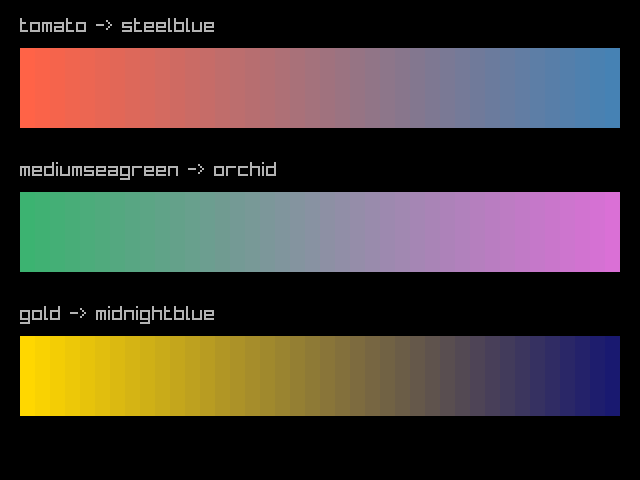
Interpolation
color_lerp() blends between two colors. Use it to create
smooth gradients:
n <- 40L
w <- 15L

from <- "tomato"
to <- "steelblue"
draw_text("tomato -> steelblue", 20L, 16L, 20L, "grey70")
for (i in 0:(n - 1L)) {
  draw_rectangle(20L + as.integer(i) * w, 48L, w, 80L,
                 color_lerp(from, to, i / (n - 1.0)))
}

from2 <- "mediumseagreen"
to2 <- "orchid"
draw_text("mediumseagreen -> orchid", 20L, 160L, 20L, "grey70")
for (i in 0:(n - 1L)) {
  draw_rectangle(20L + as.integer(i) * w, 192L, w, 80L,
                 color_lerp(from2, to2, i / (n - 1.0)))
}

from3 <- "gold"
to3 <- "midnightblue"
draw_text("gold -> midnightblue", 20L, 304L, 20L, "grey70")
for (i in 0:(n - 1L)) {
  draw_rectangle(20L + as.integer(i) * w, 336L, w, 80L,
                 color_lerp(from3, to3, i / (n - 1.0)))
}
color_alpha_blend() blends a foreground color over a
background, respecting the foreground’s alpha channel — useful for
compositing.