
Raylib distinguishes between images (pixel data in CPU memory) and textures (pixel data uploaded to the GPU). Images can be manipulated freely. Textures can be drawn to the screen.
The typical pipeline is: load or generate an image, optionally manipulate it, upload it as a texture, draw the texture.
Generating images
raylibr can generate several kinds of procedural images:
imgs <- list(
  gen_image_checked(320L, 240L, 40L, 40L, "darkgray", "gray"),
  gen_image_gradient_linear(320L, 240L, 0L, "darkblue", "skyblue"),
  gen_image_perlin_noise(320L, 240L, 0L, 0L, 4.0),
  gen_image_cellular(320L, 240L, 32L)
)
positions <- list(c(0L, 0L), c(320L, 0L), c(0L, 240L), c(320L, 240L))
for (i in seq_along(imgs)) {
  tex <- load_texture_from_image(imgs[[i]])
  unload_image(imgs[[i]])
  draw_texture(tex, positions[[i]][1], positions[[i]][2], "white")
}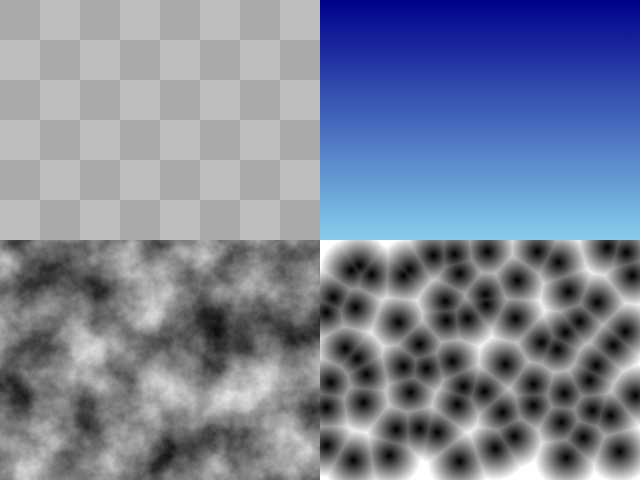
Top-left: checkerboard (gen_image_checked). Top-right:
linear gradient (gen_image_gradient_linear). Bottom-left:
Perlin noise (gen_image_perlin_noise). Bottom-right:
cellular/Voronoi (gen_image_cellular).
Other generators include gen_image_color(),
gen_image_gradient_radial(),
gen_image_gradient_square(), and
gen_image_white_noise().
Loading images
Load an image from a file with load_image():
img <- load_image("photo.png")
# Supported formats: PNG, BMP, TGA, JPG, GIF, PSD, HDR, PIC, PNM, KTX, ASTC, DDS, PKM
Check validity with is_image_valid(img) and free memory
with unload_image(img).
Image manipulation
Images live in CPU memory, so you can modify them before uploading to the GPU:
copy <- image_copy(img)
sub <- image_from_image(img, rectangle(0, 0, 100, 100))
channel <- image_from_channel(img, 0L)
You can also draw onto images with image_draw_line_ex()
and image_draw_triangle().
Drawing textures
Convert an image to a texture with
load_texture_from_image(), or load directly with
load_texture():
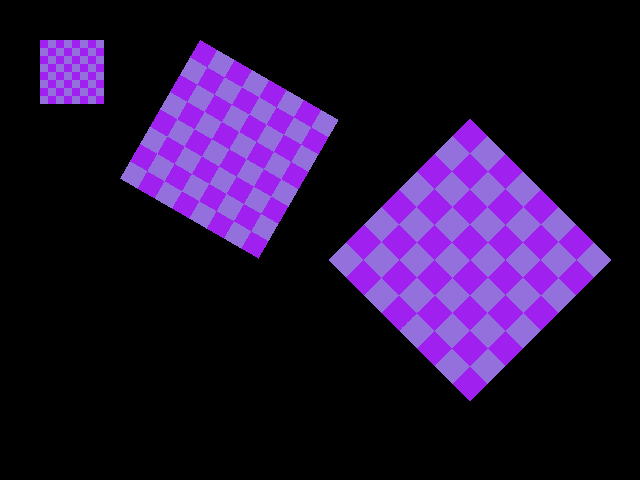
img <- gen_image_checked(64L, 64L, 8L, 8L, "purple", "mediumpurple")
tex <- load_texture_from_image(img)
unload_image(img)

draw_texture(tex, 40L, 40L, "white")
draw_texture_ex(tex, c(200, 40), 30.0, 2.5, "white")
draw_texture_pro(
  tex,
  rectangle(0, 0, 64, 64),
  rectangle(470, 260, 200, 200),
  c(100, 100), 45.0, "white"
)
-
draw_texture()draws at a position with a tint color -
draw_texture_ex()adds rotation and scale -
draw_texture_pro()gives full control: source rectangle, destination rectangle, origin, and rotation
The image can be unloaded as soon as it has been uploaded as a
texture. The texture itself must stay loaded until the frame has been
drawn: Raylib collects draw calls in a batch and only sends them to the
GPU at end_drawing(), so a texture unloaded before then is
drawn as nothing. In a game loop, load textures before the loop and call
unload_texture() after it. In these snippets the screenshot
window is closed right after the frame, which releases the textures with
it.
Render textures
A render texture lets you draw to an off-screen buffer, then use the result as a regular texture. This is the basis for post-processing effects:
target <- load_render_texture(800L, 600L)

begin_texture_mode(target)
  clear_background("black")
  draw_circle(400L, 300L, 100.0, "red")
end_texture_mode()

begin_drawing()
  draw_texture_rec(
    target$texture,
    rectangle(0, 0, 800, -600),
    c(0, 0), "white"
  )
end_drawing()

unload_render_texture(target)
Note the negative height in the source rectangle – render textures are flipped vertically in OpenGL.
Exporting images
Save an image to disk:
img <- load_image_from_screen()
export_image(img, "screenshot.png")
Supported export formats: PNG, BMP, TGA, JPG, KTX, RAW.